 SecurityZines.com
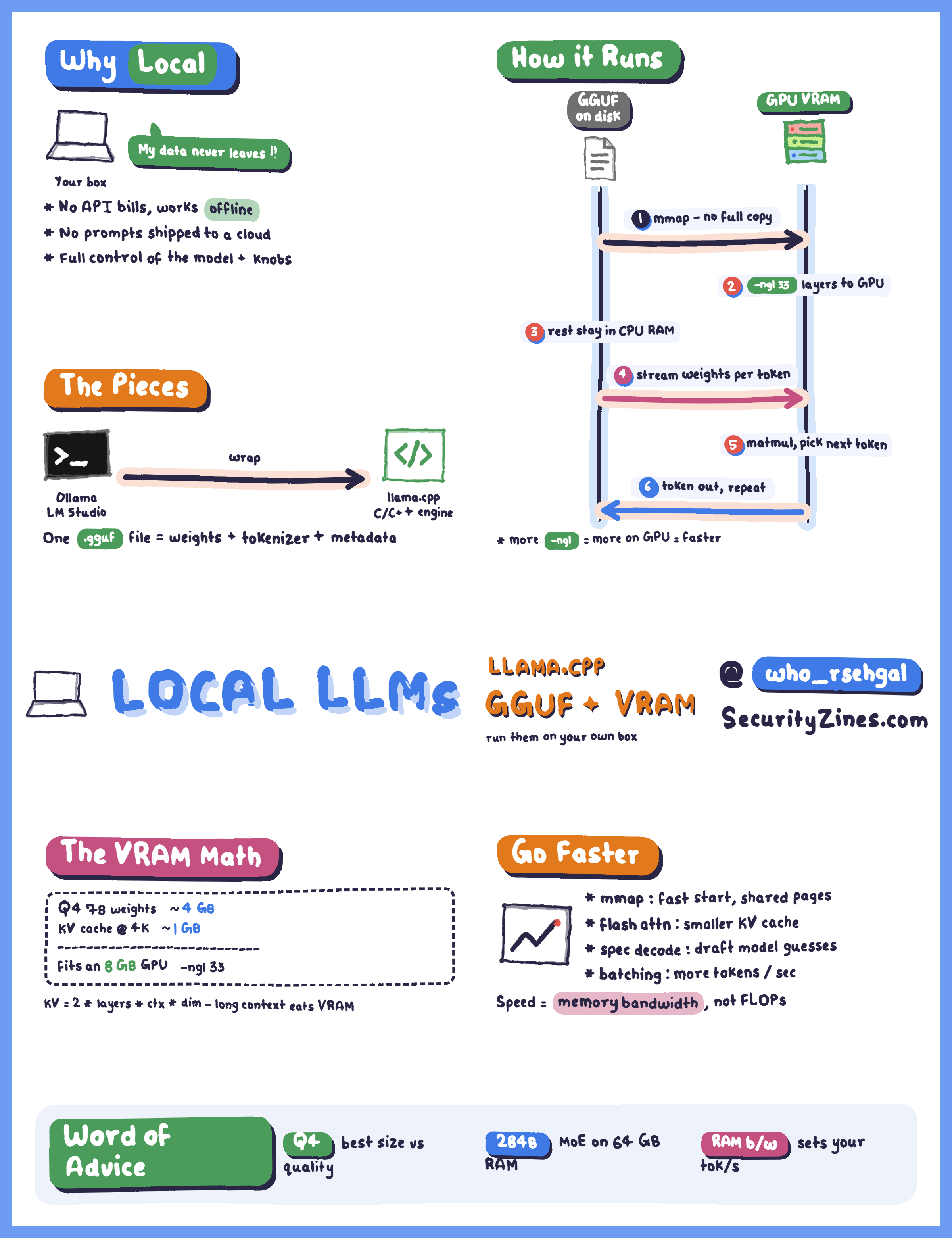
Local LLMs: how llama.cpp runs a model on your own machine, and the VRAM math behind it
Why run it locally? Your prompts and data never leave your machine. There are no API bills, it works offline, and you get full control of the model and every setting. Nothing gets shipped to a cloud provider.
The pieces:
llama.cpp is the C/C++ inference engine underneath. Ollama and LM Studio are friendlier apps that wrap it. The model itself is a single .gguf file that holds the weights, the tokenizer and the metadata together.
How it runs:
The GGUF file is memory-mapped (mmap), so it is not copied into RAM in full. The -ngl flag sets how many layers go to GPU VRAM, for example -ngl 33, and the rest stay in CPU RAM. For every token the engine streams the weights through, does the matrix maths, picks the next token, outputs it and repeats. More layers on the GPU means faster generation.
The VRAM math:
A 7B model at Q4 is about 4 GB of weights. The KV cache for a 4K context adds about 1 GB. Together that fits an 8 GB GPU with all layers offloaded. The KV cache grows as roughly 2 x layers x context x dim, so long contexts eat VRAM quickly.
Going faster:
mmap gives fast startup and shared pages. Flash attention shrinks the KV cache. Speculative decoding lets a small draft model guess tokens that the big model then checks. Batching gets more tokens per second when serving several requests. The big lesson: local speed is set by memory bandwidth, not by raw compute, so RAM and VRAM bandwidth decides your tokens per second.
Q4 gives the best size to quality balance for most people. Fit as many layers on the GPU as you can, and watch the KV cache when you raise the context length.